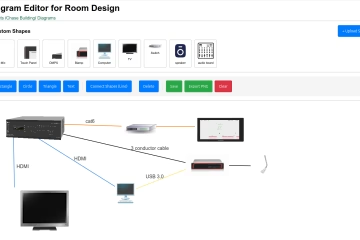
We just shipped two of our most-requested features: Rack Diagrams and Signal Flow Diagrams (SIGFLOW). Here’s what they do and why we built them.
For anyone who has managed an AV installation, you know the drill: the rack diagram lives in a Visio file on someone’s desktop, the signal flow is a hand-sketched photo from commissioning day, and the actual inventory is in a spreadsheet that hasn’t been touched in eight months. When something breaks or a client calls with questions, you’re hunting across three tools and hoping the documentation is still accurate.
Find Boxes was built to be the single source of truth for AV and IT teams. Today, we’re taking a big step toward that with two new visual planning tools built directly into the platform.
Rack Diagrams
Plan and document your equipment racks without ever leaving Find Boxes.
The new multi-rack diagram planner lets you build a visual layout of any rack — or an entire room full of them — using the equipment already in your inventory. Drag and drop gear into position, assign it to rack units, and see your available U space at a glance. When you’re done, export a clean PNG to drop into a proposal, a close-out package, or a client hand off doc.
Key features:
- Multi-rack support in a single view
- Drag-and-drop with touch support for tablet use in the field
- Real-time U-space tracking per rack
- Export to PNG for proposals and documentation
- Diagrams saved directly to your Find Boxes project
Because rack diagrams are tied to your project and inventory, changes to your equipment list are always reflected in context. No more disconnected Visio files floating around.
Signal Flow Diagrams (SIGFLOW)
Map the signal path from source to display — interactively, in the browser.
SIGFLOW is an infinite-canvas signal flow editor built for AV professionals. Add sources, processors, switchers, amplifiers, displays, and any other device to the canvas, then draw the connections between them. Connections route orthogonally and cleanly, so even complex systems stay readable.
Key features:
- Infinite canvas with smooth pan and zoom
- Orthogonal, auto-routed signal connections
- Full touch and mobile support
- Add any device type from your Find Boxes inventory
- Diagrams saved to your project alongside proposals and expenses
Whether you’re designing a new conference room, documenting an existing install, or handing off a system to a client’s IT team, SIGFLOW gives you a clean, shareable signal flow that actually matches what’s in the field.
Why It Matters
Rack diagrams and signal flow charts aren’t new ideas — the AV industry has been drawing them forever. What’s new is having them integrated with your inventory, your projects, and your proposals in one place.
When a piece of gear gets swapped out, you update it once in Find Boxes. Your rack diagram, your signal flow, your proposal, and your expense tracking all stay in sync. That’s the whole point.
Available Now
Both Rack Diagrams and SIGFLOW are available to all Find Boxes subscribers today. Open any project and look for the Diagrams section to get started.
If you’re not on Find Boxes yet, start a free trial and see how it compares to managing AV projects across a stack of disconnected tools.