Equipment checkout software built for campus
Give students, faculty, and staff a simple way to borrow gear and give your team a clear record of who has what and when it's due back. QR codes scanned from any phone, automatic return reminders, and no per-seat fees.
30 days free · No credit card required · Unlimited users
Semester chaos is not a workflow
Hundreds of borrowers, thousands of checkouts, and an equipment budget the dean expects you to account for. Paper sign-out sheets and spreadsheets weren't built for this.
Gear vanishes by finals week
Cameras, laptops, and adapters walk out the door in September and nobody knows where they are in December. Every missing item is a line in next year's budget request.
No accountability for borrowers
"Who had the tripod last?" shouldn't be a mystery. Without a record tied to each student or staff member, returns slip, damage goes unreported, and your team gets the blame.
Spreadsheets can't keep up
Shared spreadsheets and paper forms can't stop double-bookings, won't send reminders, and fall apart the moment a new student worker takes a shift at the desk.
A day at the checkout desk
Find Boxes runs your entire lending workflow — from the moment a student asks for a camera to the end-of-year inventory audit.
Every item has a live status
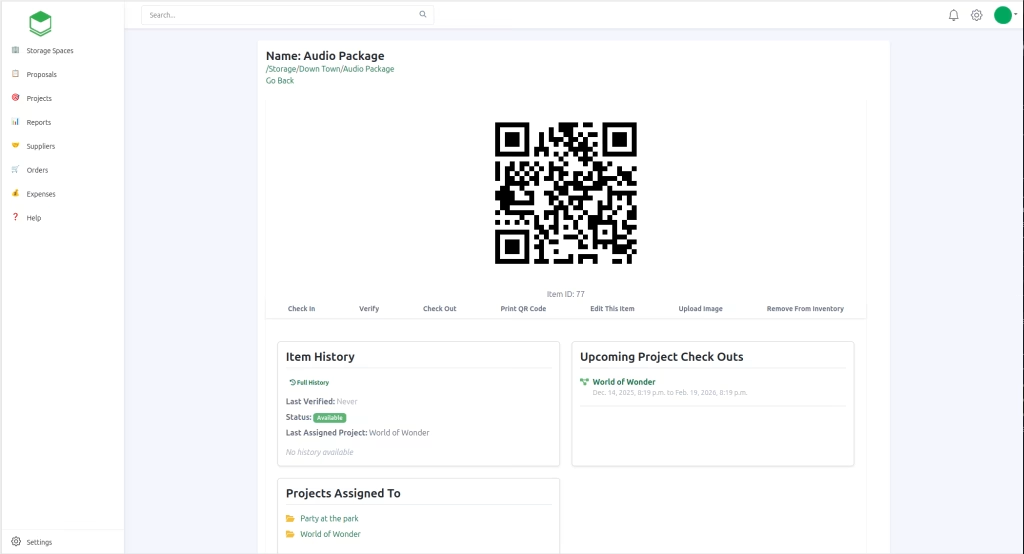
Each piece of equipment in Find Boxes shows whether it's available, checked out, out for service, or assigned to a project — along with who has it. Scan the QR code on the item with any phone or tablet to pull it up instantly. No barcode scanners to buy, no app for borrowers to install.
Bundles keep kits together
Group a camera body, lens, tripod, and SD card into one bundle and check the entire kit out to a student in a single scan. Everything comes back together — or you know exactly which piece didn't.
Automatic return reminders
When a checkout happens, the borrower automatically gets an email telling them when the equipment is due back. Your team stops playing collections agent, and past-due reports show you exactly who to chase when something slips anyway.
Conflicts are blocked automatically
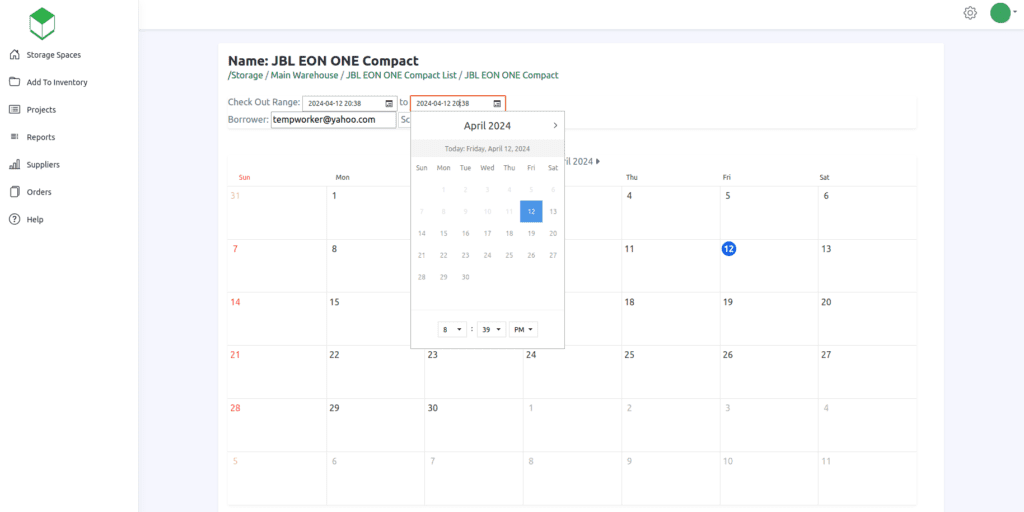
Find Boxes won't let an item be checked out if it's already with another borrower, out for service, or assigned to a project. The front desk doesn't have to remember anything — the system enforces it, even on a brand-new student worker's first shift.
Reports the dean will actually read
Run reports on what's past due, what has low availability, and what hasn't been counted recently. When it's time to justify next year's equipment budget — or find out what went missing — the answer is a click, not a weekend of counting.
Built for every equipment room on campus
If your department lends gear to students, faculty, or staff, Find Boxes fits the workflow.
Film & Media Production
Camera kits, lenses, audio recorders, and lighting checked out to students every week of the semester.
Classroom & AV Services
Projectors, microphones, and adapters loaned to faculty — tracked instead of "borrowed indefinitely."
Libraries
Laptops, chargers, calculators, and hotspots circulating to students with due dates and reminders.
Engineering & Science Labs
Test equipment, tools, and components signed out to lab sections with full accountability.
Athletics
Team equipment, radios, and training gear issued to staff and student athletes each season.
Theater & Performing Arts
Lighting, sound, costumes, and props tracked across productions, classes, and rentals.
Unlimited users. Flat pricing.
Most checkout software charges per seat. On a campus, that math never works — student workers rotate every semester, and every new hire at the desk is a budget conversation. Find Boxes is flat-priced.
Per-seat checkout software
- Every student worker is a paid seat
- Costs climb each semester as staff rotates
- Barcode scanner hardware to purchase
- Pricing requires a sales call to find out
Find Boxes
- Unlimited users — add every student worker
- One flat price that doesn't move with headcount
- QR codes scanned with any phone or tablet
- Transparent pricing, 30-day free trial, cancel anytime
Ready before the semester starts
Sign up free
Your first 30 days are free — no credit card needed. Set up takes an afternoon, not a procurement cycle.
Build your inventory
Add equipment from our preloaded manufacturer database or create custom items. Print QR labels and tag your gear.
Start checking out gear
Scan, assign to a borrower, set the due date. Reminders, conflict-blocking, and reports run on their own.
Questions from campus teams
No. Find Boxes uses QR codes, which you can scan with any mobile phone or tablet. There's no scanner hardware line item to get approved — your team's phones already work.
Yes. When equipment is checked out, the borrower automatically receives an email telling them when to return it — so your team isn't chasing students for gear at the end of the semester.
Yes. Find Boxes will not let an item be checked out if it's already checked out, out for service, or assigned to a project. Conflicts are blocked automatically.
Yes. Bundles let you group items that belong together — like a camera, lens, and tripod — and check the entire kit out in one action. Everything is tracked back to the same borrower.
Find Boxes uses flat pricing with unlimited users. Add every student worker, graduate assistant, and front-desk volunteer without your bill changing — unlike per-seat tools where each semester's new hires cost more.
You can report on past-due checkouts, items with low availability, and items that haven't been counted over a period of time — exactly what you need for end-of-year audits and budget planning. More reports are added regularly.
Yes. Find Boxes has a full REST API and an official MCP server, so your IT team can integrate it with campus systems or build custom workflows — including AI-assistant integrations.
Know where your gear is — all semester long
Set up your equipment checkout system in an afternoon. Your first 30 days are free, with no credit card needed at sign up.
Start your free trial30 days free · No credit card · Unlimited users